PadBrain · worship drummers
PadBrain for worship drummers
The set list lands in the group chat on Saturday night, and Sunday’s rehearsal is thirty minutes. PadBrain is a free app made for that week: turn the list and the tracks into a set in one go (on the Mac and, from 1.0.13, on the iPhone and iPad), then on stage, one iPhone or iPad sends the tracks to the house and the click to your ears.
Which drummer are you?
1. The Sunday worship team drummer
Set list in the group chat, one backing track per song. You serve every week.
2. The multitrack worship drummer
Drumless stems, click and guide. The form changes every week.
3. The small-church drummer without tracks
No backing tracks, just piano and guitar. Only you hear the click.
4. The new youth or student drummer
Lots of songs to learn, and the tempo still wobbles.
Your week
- 1
Get the list
Use the song list your leader sent by chat or message as it is. Keys, BPM and form (Intro 4 V1 8 C 8) are read too.
- 2
One-click prep
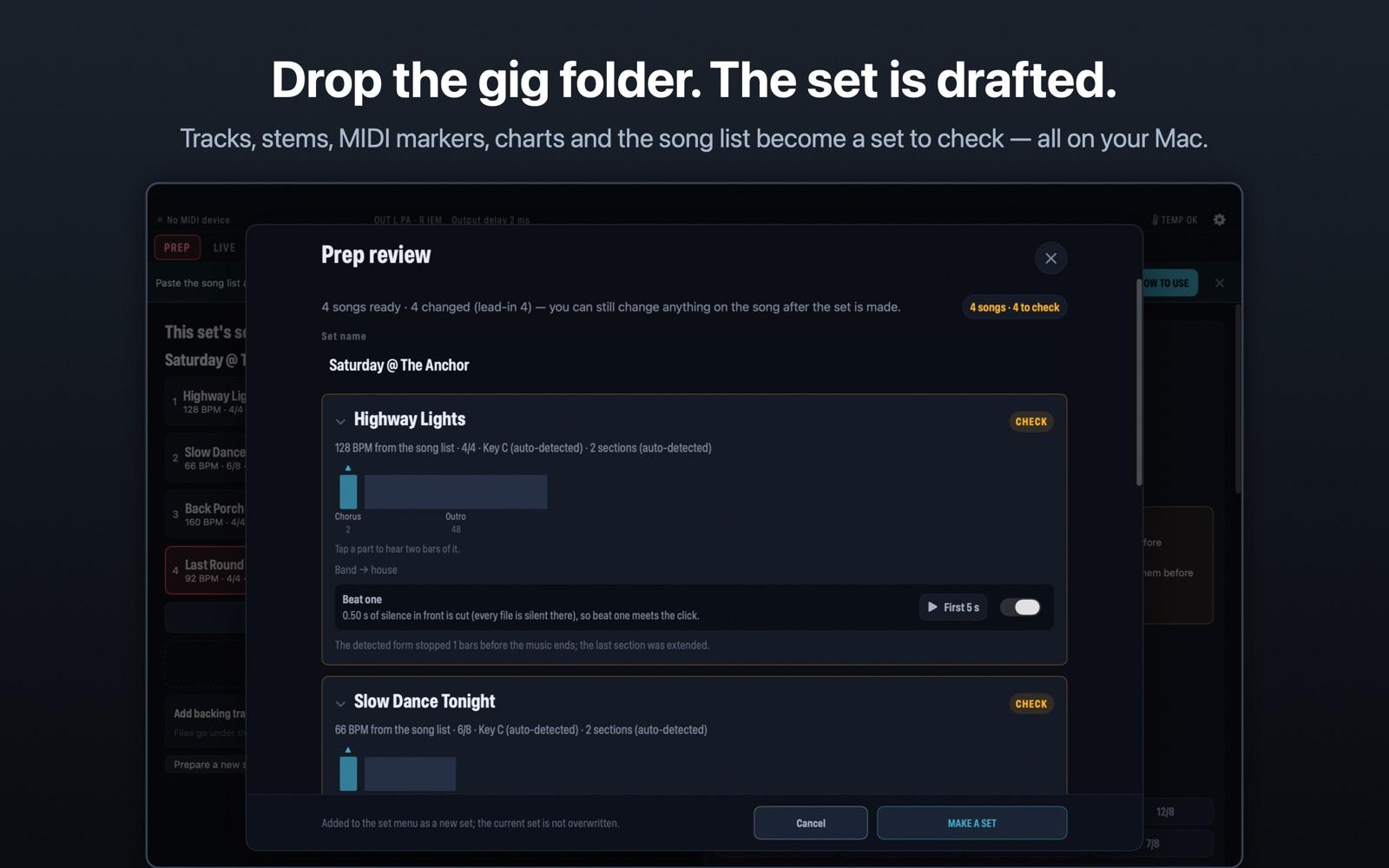
Drop the list and the folder of tracks and get a set with each song’s tempo, meter, sections and beat one. The rehearsal check finds where the click and the track drift apart.
- 3
Send it to your iPhone
“Send this set to your iPhone…” → AirDrop, then “Add as a new set” on the phone. Done.
- 4
Sunday
Tracks to the house, click and counts in your ears. LIVE LOCK guards against stray taps on stage.
A Sunday team playing to one track per song
1. The Sunday worship team drummer
You volunteer on drums in your church’s worship team. The leader sends the set list on Saturday, and each song has a single backing track (sometimes a video file). Rehearsal is short.
What gets hard
- ·The list comes late, and you write BPM, key and form again for every song.
- ·Track files are named every which way, so you lose track of which is which.
- ·Silence during prayer or between songs feels awkward.
- ·You worry about hitting the wrong thing on stage.
With PadBrain
- ·Paste the list and get a set — service items like prayer and announcements are left out, and keys, BPM and form come along.
- ·One-click prep reads a one-file song as its backing track and takes video tracks and zips as they are. If the names are a mess, AI help (optional) pairs them with the songs.
- ·An ambient pad in the song’s key fills prayer time and the space between songs.
- ·LIVE LOCK and big pads guard against mistakes, and one bar of the next song’s click reaches your ears before the song ends.
Wiring One USB‑C splitter cable is enough to start: left to the house (speaker), right to your ears (click). More on the rigs page.
A team playing with stems and a guide
2. The multitrack worship drummer
Your team plays each song with stems (bass, keys, vocals, pads) and a click and guide track. The leader calls one more chorus or jumps to the bridge on the spot.
What gets hard
- ·When the leader suddenly calls “one more chorus”, the tracks can’t follow.
- ·Every week you decide again which stems go to the house and which only to your ears.
- ·The click drifts in songs that change tempo or use odd meters.
- ·Laptop, interface and cables make setup long.
With PadBrain
- ·Section buttons move on the next bar line. Tap the section you’re in for “once more”.
- ·A spoken count into sections, and a “voices only” band fade.
- ·One-click prep sends each stem to your ears, the house or mute, and with a click track and MIDI markers it reads tempo changes and odd meters.
- ·If things slip, one SYNC puts the click back on the band’s one (undo for ten seconds).
Wiring Split the house and your in-ears with an audio interface’s outputs or a Y cable. The pre-show check tells you when you’re Ready.
No tracks — just click and pads
3. The small-church drummer without tracks
You play with piano and guitar, no backing tracks. You want to hold the tempo, but the click must not reach the room, and prayer time needs a soft sound.
What gets hard
- ·You want a click but worry it leaks into the speakers.
- ·Hymns are often in 6/8 or 3/4, and they stretch between verses.
- ·You keep resetting the metronome for every song.
With PadBrain
- ·Click in your ears only — PadBrain warns you when the wiring would put the click in the room.
- ·Paste the list and every song gets its BPM and meter; move to the next song and the click follows.
- ·An ambient pad in the song’s key and the worship kit’s pads fill out a small band.
- ·Write 3/4 or 6/8 on the list and the click plays that meter, with a count-in before every song.
Wiring With a Y cable: left to the house (pads, ambient), right to your ears (click). Before the service, stand in front of the speaker and make sure you can’t hear the click.
Just starting in the youth band
4. The new youth or student drummer
You took over drums in the youth or student band not long ago. You want to practise Sunday’s songs during the week, but the originals are fast and hard.
What gets hard
- ·The original tempo is still too fast to follow.
- ·You lose track of the form — where, and for how many bars.
- ·No money for gear or paid apps.
With PadBrain
- ·Practice tempo from 50% to 150% — track and click slow down together, and the pitch stays.
- ·HOLD repeats the section you are in until you press it again: loop the hard part.
- ·The next section shows on screen, with a spoken count into each section.
- ·Play along right away with the drumless worship sample set. Every feature free, no ads, no account.
Wiring An iPhone and earphones are all you need. Output: SAME BOTH SIDES.
Good to know
- ·Worship songs and backing tracks (single tracks or multitracks) are not included. Use the tracks and charts your church already has.
- ·Every feature is free, with no ads and no account. Only the optional AI help in prep goes online, after you allow it; the iPhone and iPad never go online on stage.
- ·Try it with your team and tell us what you need through Feedback.